
Features / Configuration Level / Dashboard
Challenge Points
Challenge Points add an extra layer of protection to specific actions within the CHIME Dashboard.
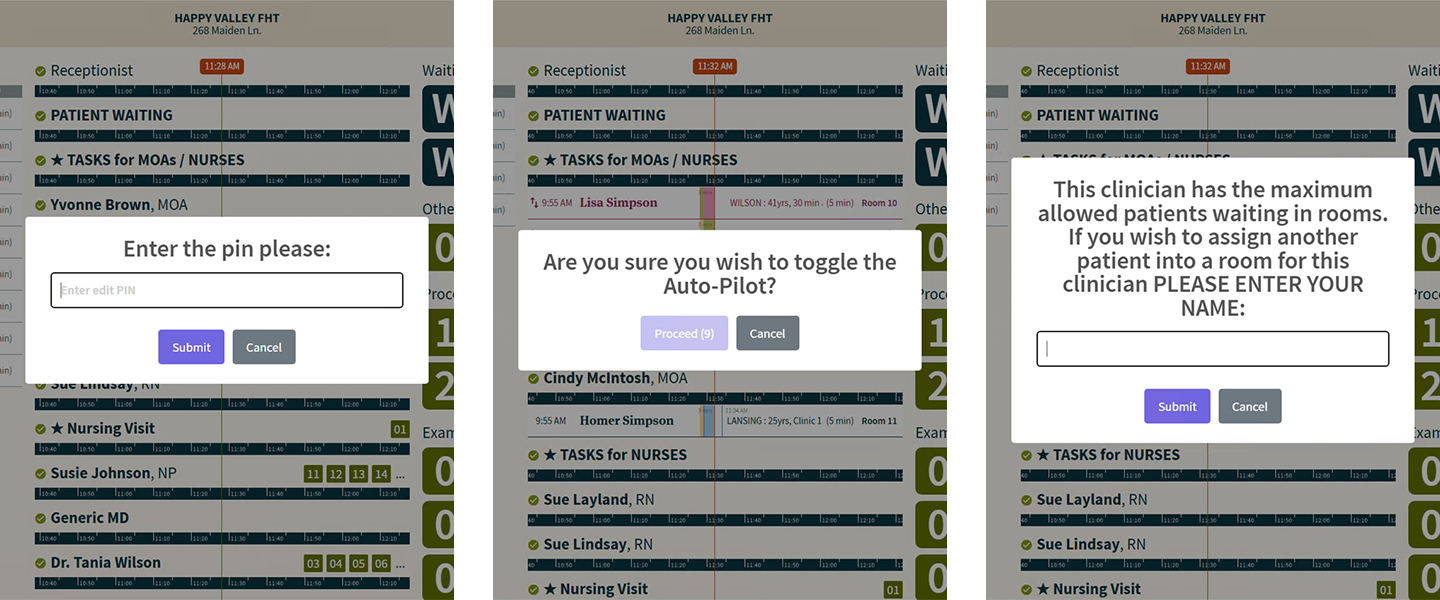
What is a “Challenge Point”?
A Challenge Point acts as a configurable gate: before an action is completed, the user must first pass a challenge such as entering a PIN, waiting through a short delay, or entering their name. This allows clinics to add a little more friction around actions that are sensitive, easy to trigger by mistake, or important to track more carefully.
In practical terms, this means CHIME can help reduce accidental overrides while still allowing staff to move forward when needed. Depending on how your clinic is configured, the challenge can be simple and fast, while still making the user pause and confirm that they intended to take the action. Some challenge types can also support clearer accountability by recording who initiated the action.
As of now, Challenge Points can currently be configured for two interactions:
Toggling Auto-Pilot on or off
Overriding the “maximum patients waiting in room” limit by manually advancing a patient into a room
This feature is especially useful for clinics that want to balance flexibility with consistency. Most of the time, CHIME can continue to run according to your clinic’s usual rules. But when someone needs to step outside those rules, a Challenge Point can help ensure that the action is deliberate.
Types of Challenge Points
Challenge Points can be configured in different ways depending on the situation. Current options include:
PIN
Requires the user to enter a PIN before continuingDelay
Requires the user to wait briefly before continuingName Entry
Requires the user to enter their name before continuing
Why use Challenge Points?
Challenge Points can be helpful when you want to:
reduce accidental changes
add a deliberate pause before important overrides
improve accountability for sensitive actions
give clinics more control over how exceptions are handled
Like many parts of CHIME, this feature can be configured to reflect the needs and preferences of your clinic.
Need Help Configuring This Feature?
If you would like to enable or adjust Challenge Points for your clinic, please contact the CHIME Support Team via email : support@chimeclinic.com