
Guides / Basic Staff Walkthrough
CHIME Colour Code Legend
When you look at your queue in CHIME, the colour of a patient’s name tells you where they are in their visit and whether you need to take action.
Striped Area
The striped portion marks the patient’s scheduled appointment for the primary visit.
This helps you quickly compare what was scheduled with what is happening in real time.
By default, CHIME adds the time it takes to do a prep step by support staff (e.g. prep room, take vitals, urine test, etc.) on top of the estimated appointment time that we get from your EMR for the main MD step. In other words, if your EMR tells us that John Doe’s periodic health exam is going to take 30 minutes with an MD, CHIME will add an additional 10 minutes for the support staff to do any extra prep that such an appointment might require. So the total length of the appointment in CHIME will be 40 minutes (10 minutes for prep with support staff, 30 minutes for Periodic Health Exam with an MD). Of course, this is configurable.
Orange
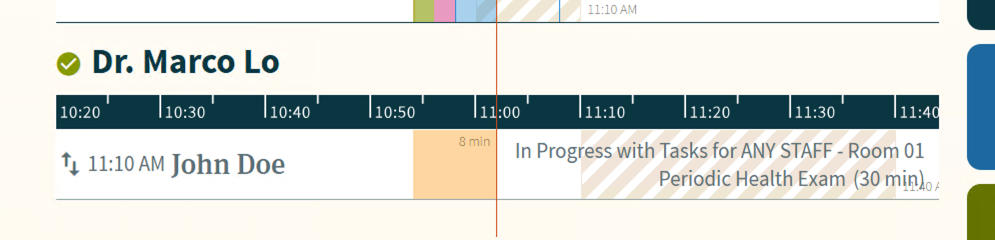
The patient is with another provider.
CHIME will indicate which room and what provider with some text beside the appointment.
Green
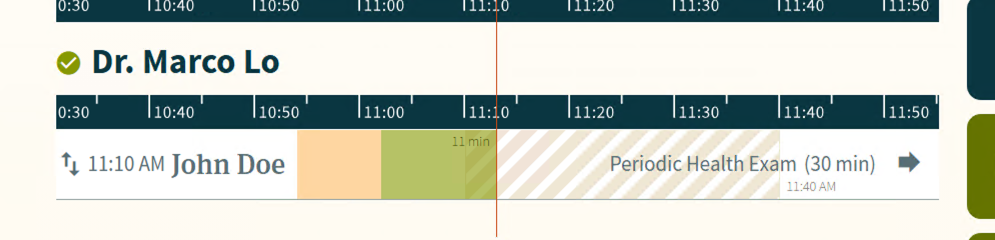
The patient is checked in and waiting, but has not been placed in a room yet.
In most cases, this means the patient is in the waiting room and is ready to be assigned into a room. If auto-rooming is turned on, you can hover over the patient’s name in your queue (or click on their name to access the “edit patient” modal window) and CHIME will show you a reason why this patient has NOT been auto-roomed yet.
Pink
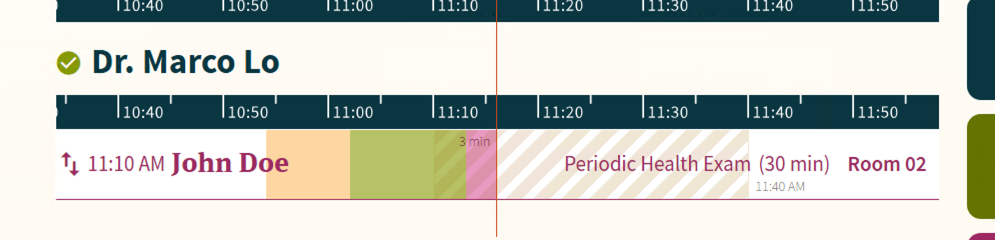
The patient is ready and waiting for you in a room.
This is usually the main colour clinicians care about most. It means the patient has been roomed and is now waiting for the next clinician or staff member to begin their part of the visit. In other words: the patient is ready for you.
Blue
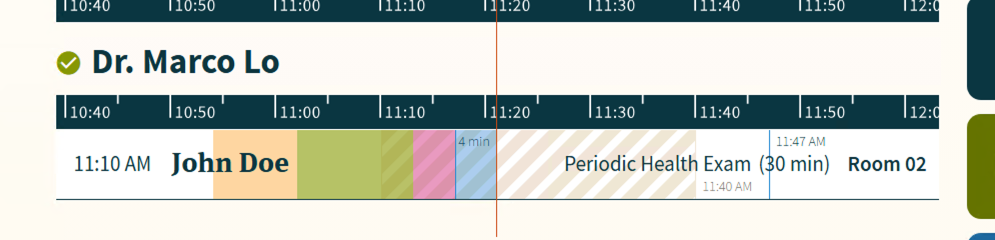
The visit step is currently in progress.
For a clinician, this usually means someone has checked in at the room tablet and the current step has started. If you have checked in to see the patient, the visit in your queue will turn blue while you are with them.
Quick Reference…
From a clinician’s perspective, the colours usually mean:
Striped — the estimated time that a visit step should take
Orange — patient is currently with another provider
Green — patient is waiting and ready to be roomed
Pink — patient is ready for you
Blue — you are seeing the patient