
Tutorials / Everyday Tutorials
Backing Up the CHIME Database
CHIME automatically records most of the information needed to investigate technical issues. In some cases, however, our regular logs may not capture enough detail to determine exactly what happened. When this occurs, the CHIME team may ask you to manually create a backup of your clinic’s database.
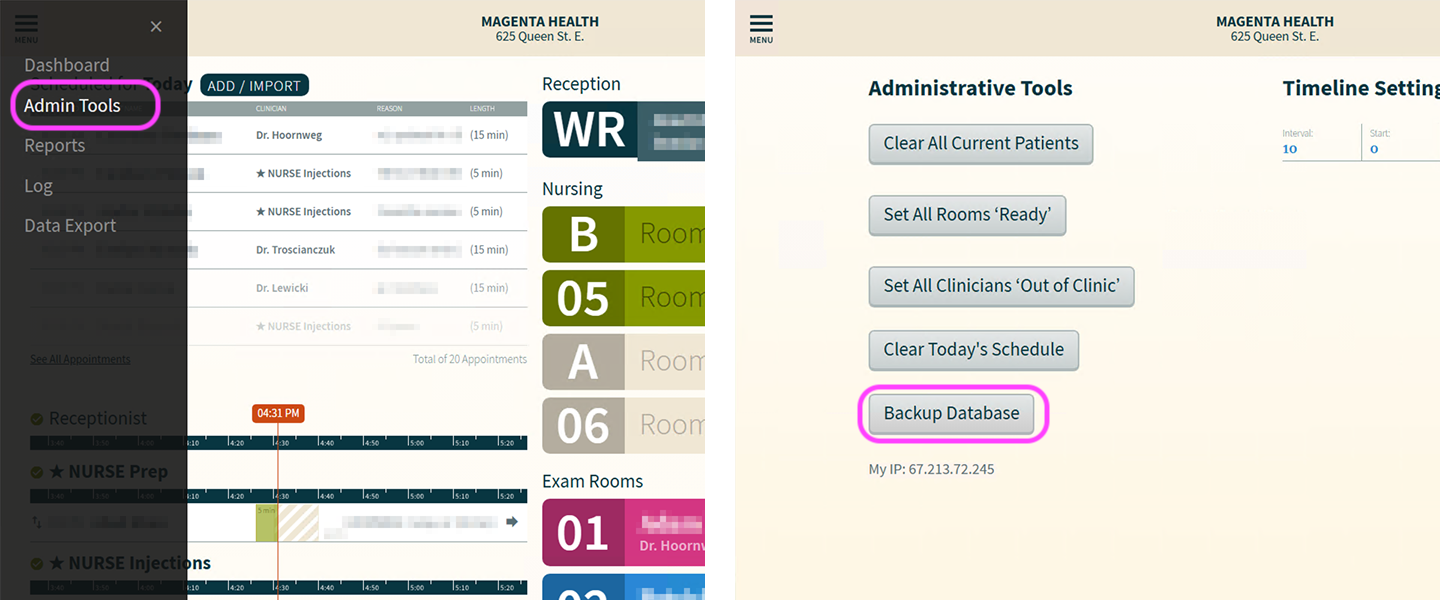
How to Back Up Your CHIME Database
Navigate to the Administrative Tools section of the CHIME Dashboard
Open the CHIME Dashboard
Click the hamburger menu in the upper-left corner.
Click “Admin Tools”
Once there find and click the button that says ‘Backup Database’. This may take several minutes. After creating the backup, email your CHIME account manager or support contact with:
A description of the issue
The approximate date and time it occurred
The patients, clinicians, rooms, or devices involved
Confirmation that you created a database backup.
IMPORTANT
Only create a database backup when instructed to do so by the CHIME team.
CHIME already has the information required to investigate most issues, and many problems can be resolved using the system’s existing logs. Creating an additional database backup is only necessary when we need a more detailed snapshot of the clinic’s system.