
Tutorials / Hardware Tutorials / CHIME Tablets
Battery Swelling & Replacement
At CHIME, we want to ensure your clinic’s hardware remains as reliable as the software running on it. From time-to-time, like all mobile devices, the internal batteries in your room tablets may reach the end of their lifespan and show signs of “swelling” or “bulging”. While this is uncommon, it is a known phenomenon with tablet hardware over extended use.
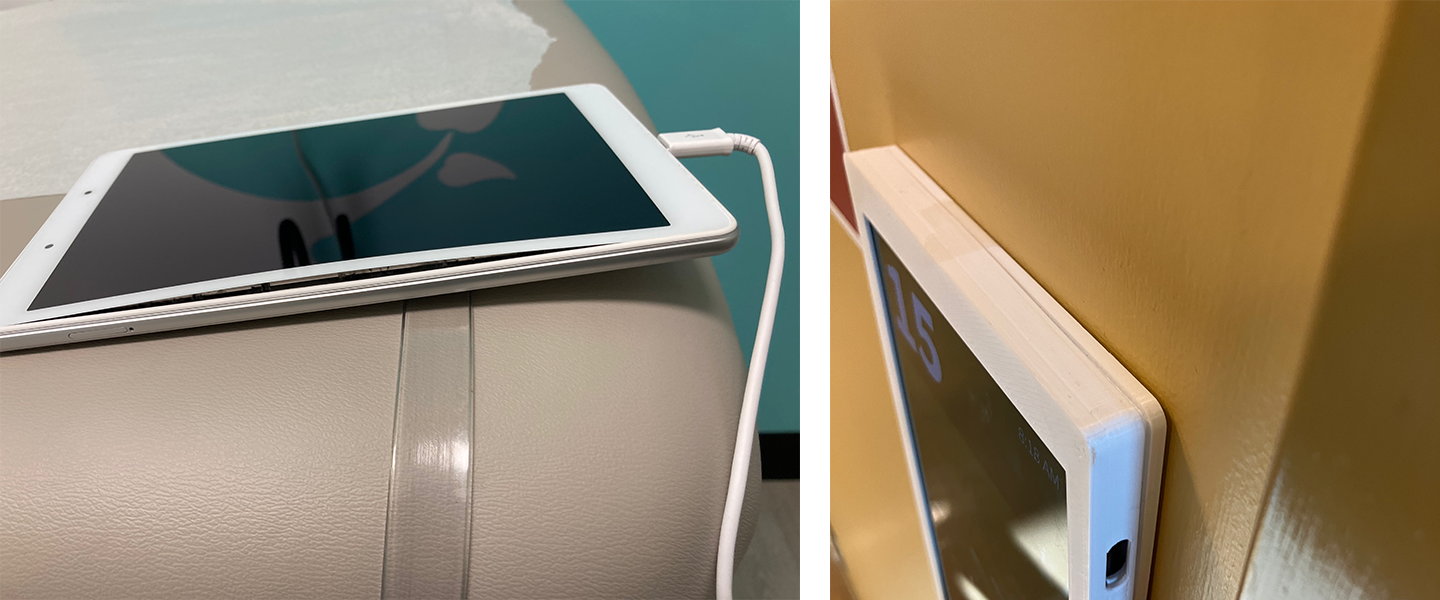
What Is “Battery Swelling”?
Lithium-ion batteries can degrade over time due to age, heat, charging patterns, or manufacturing variance. In rare cases, this degradation can cause the internal battery to expand.
With CHIME’s Room Tablets, this may present as:
Screen Lifting
The tablet display may appear to be "pushing out" or separating slightly from the framePhysical Deformation
The tablet / enclosure may be bulging or the tablet may no longer be sitting flush in its enclosurePower or charging issues
The swelling can sometimes cause intermittent power loss or charging issues
If you notice any of the above, please treat it as a hardware issue and notify us.
Safety Note
Battery swelling is not typically dangerous when identified early, but lithium batteries should always be handled with care. If a tablet appears significantly swollen, hot, cracked, or leaking:
Power it down immediately.
Avoid handling it unnecessarily.
Contact us right away.
Our Replacement Process
Once you identify a tablet that needs attention, we make the replacement process as seamless as possible. We have successfully managed these replacements for several of our clients with minimal, or zero downtime for the rooms in their clinic.
1) Report the Issue
Send an email to support@chimeclinic.com
Please include the room number, a photo (if possible), any relevant details (physical description)
2) We Order Replacements
We will order, configure and ship replacement devices to you. You’ll only be charged for the direct cost of the batteries (typically around $40 per battery, depending on your tablet model). Shipping, handling and labour are covered by us.
3) Tablet Swap
Clinics have two options for swapping the tablets:
Self-Swap (Recommended for most clinics)
Your team can remove the affected tablet and install the replacement unit. We will provide simple instructions as needed.Onsite IT Support (At CHIME’s Cost)
If preferred, we can coordinate for an IT technician to attend your clinic and complete the swap. We will cover the cost.
Our objective is to minimize operational disruption and make the replacement process straightforward.
4) Return Affected Devices
Once the replacement is complete please ship the affected devices back to us. We’ll provide a prepaid shipping label to facilitate this. Returning the affected tablets allows us to safely dispose of the battery and assess the hardware.
Proactive Battery Protection (Optional)
Most CHIME Room Tablets support a built-in Battery Protection feature that limits charging to ~80–85% to extend battery lifespan. To enable it simply follow the steps in this article about enabling battery protection on your tablets.
Our Commitment
CHIME is designed to “just work.” When hardware issues arise, we manage them collaboratively with you. Our proactive monitoring, structured hardware maintenance process, and clear replacement pathway are designed to minimize disruption and maintain system reliability.
If you have any concerns about a specific device — even if you’re unsure — please email: support@chimeclinic.com
We would always rather assess early than replace late.