
Articles & Case Studies / Case Studies
Waiting Room Management
Can CHIME be used only in a clinic’s waiting room, without orchestrating the whole clinic?
Yes! Read on to learn more.

#1 — Small Clinics
Some clinics (e.g. 4 or less exam rooms) are so small that “clinic orchestration” is unnecessary. These clinics often only have 1 or 2 clinicians supported by a single staff receptionist or medical assistant.
It’s not realistic to expand, nor to have less support staff. For these clinics a reduced version of CHIME can still be useful, enabling the single support staff to step away more easily to, for example, prep patients or clean rooms while allowing most patients to check-in effectively.
#2 — As a Temporary Solution
Sometimes, it doesn’t make sense to proceed with CHIME right now because of a specific reason. Most commonly, this is because a move to a different physical site is anticipated within the next 1–2 years and that would be the better time to adopt CHIME.
However, for some clinics there might still be a burning need to reduce the burden on reception staff. A reduced version of CHIME can be used in such situations to help the reception team although we note, we feel a successful deployment requires the clinic to subjectively feel a very high “need” for the system.
The Challenge
In our experience, most standalone kiosk deployments fail because they become an afterthought. The kiosk is used a relatively low percentage of the time, and one day, there’s a hardware glitch and instead of bothering to ‘fix’ the kiosk, the kiosk ends up in the corner, gathering dust.
We do not wish to sell our kiosk into this type of environment. Our challenge is to ensure our kiosks become a key and integral part of the “team”.
The Solution
Our solution to the Challenge is as follows:
We deploy an instance of CHIME, including an onsite server, to ensure a secure and privacy aware architecture.
We deploy a self check-in kiosk with a goal of ensuring 80%+ of all patients check-in via the kiosk.
We deploy a waiting room TV so that patients who check-in have visual evidence and see that they haven’t been forgotten. This is a key element to drive self check-in kiosk usage.
We deploy a portable tablet so that staff can easily manage what appears on the waiting room TV (in addition to real-time EMR integration) and to see patient wait times.
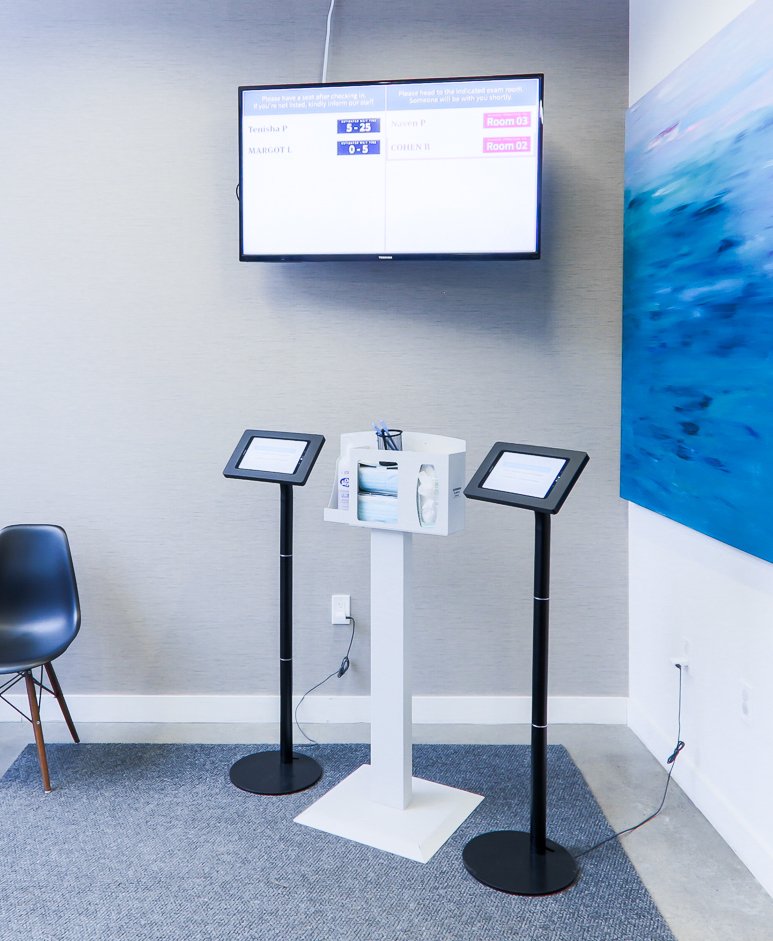
Hardware & Installation
A standard hardware package comprises a physical server, a kiosk, and a TV companion device. Together with setup, this package is available for a one-time cost of $3,500. Additional kiosks are available for $1,150 each (we recommend 1 kiosk for every 5 - 7 exam rooms). We include a complimentary refurbished portable tablet at no cost.
Assuming a waiting room TV is already in place, clinics can usually assemble and install these elements on their own in a couple hours, or ask their MSP to do so on their behalf.
If a waiting room TV is needed, we provide this advice of what to procure and install.
If a clinic expands to “full” CHIME and the hardware can be effectively repurposed, this one-time cost will be credited back to the clinic in full.
Ongoing Costs
In order to achieve 80%+ of all patients checking in via a kiosk, it’s important that we work closely with your clinic to ensure nearly all patients can effectively check-in via the kiosk, and actually do so. In every successful deployment to date, this has required iteration over a period of several months.
To support our collaboration with you in this regard, there is an annual cost of $2,850 (with extra fees potentially payable for particularly complex clinics).
Key Features
All of the typical CHIME kiosk features are generally available, but subject to adjustment if deployed without full clinic orchestration:
Confirming Patient Contact Information
Caveats
We are currently able to offer this functionality only with OSCAR Pro, Telus PS, Telus MedAccess, and Telus CHR in the event the Enterprise API has been purchased.
There are scenarios where we do not believe a deployment will be successful. In those situations, we will typically decline to provide our services. Our sincere apologies.
Some change management will be needed. For example, clinic staff will need to reliably update patient appointment statuses in the EMR.
Deployment of the waiting room TV is mandatory. In our experience, patients are very worried that if they check-in via a kiosk, they will be “forgotten”. A waiting room TV resolves this concern and is important for real-world adoption.
It is not possible to show waiting times on the waiting room TV without full clinic orchestration.