
Guides / Importing Appointments
Appointment Data Available from Accuro QHR
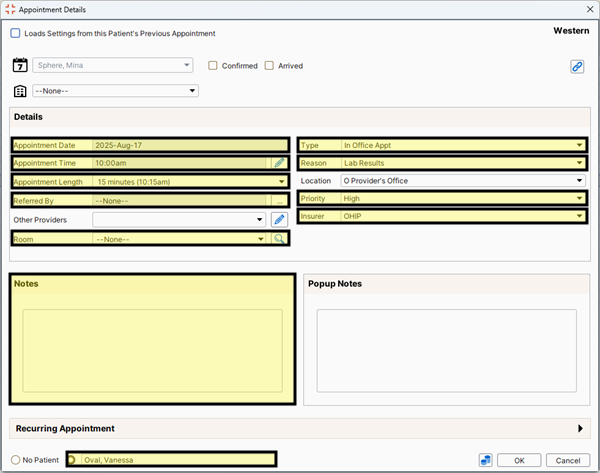
When we import EMR appointment data into CHIME, we can access different data from different EMRs. Here’s the specific data fields we can access from Accuro QHR.
For Accuro QHR we have access to the following information for each appointment:
Date
Type
Start Time
Reason
Length
Referring Provider
Priority
Insurer
Room
Notes
We also have access to the patient’s information for whom the appointment is scheduled. This information is:
Name (Last name and First name)
Birthdate
Personal Health Number
Address (Street Address, City, Province, Postal Code)
Home phone, work phone, and cell phone
Email
Occupation
File Number
Family Provider
Status
Each of these data fields can be used for the purpose of applying rules and templates.