
Guides / Importing Appointments
Appointment Data Available from Telus PS (Practice Solutions)
When we import EMR appointment data into CHIME, we can access different data from different EMRs. Here’s the specific data fields we can access from Telus PS (Practice Solutions).
For Telus PS (Practice Solutions), we have access to this information for each appointment:
Date & Start Time
Duration
Type
Medium
Details
Status
No Show Checkbox
Primary Provider
Secondary Provider
Foreground & Background Colours
Patient #
Patient’s Name (Surname, First name, Middle name, and Preferred name)
Patient’s Birthdate / Age
Patient’s Street Address
Patient’s Email
Patient’s Health Number & Version Code
Patient’s Home phone, business phone, and mobile phone
Comments
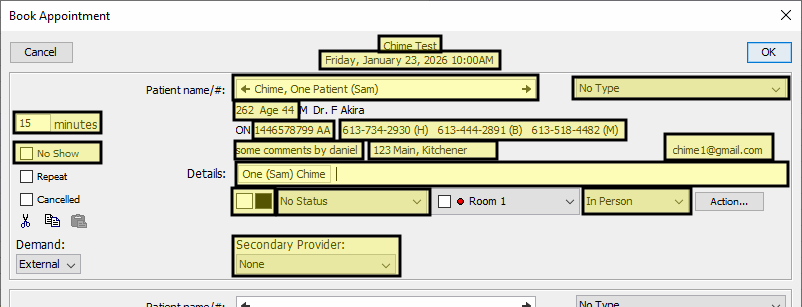
Each of these data fields can be used for the purpose of applying rules and templates.